
A file name in File Explorer answers an identity question: which item am I looking at? It does not, by itself, answer whether the file's contents are present on this Windows PC. OneDrive Files On-Demand makes that difference useful when planning work somewhere without an Internet connection. Follow a fictional file called reunion-outline.docx through three separately declared states. Its name stays unchanged. These are explanations of Microsoft's documented states, not results from an account, download or offline test performed for this article.
State one: visible, but online-only
Microsoft describes online-only files as visible in File Explorer without occupying local storage for their contents. They download when opened while connected. Without an Internet connection, an online-only file cannot be opened.
In the first version of the example, reunion-outline.docx is online-only on the particular PC being taken to a meeting. A relative can see the name and recognize the right document, but that recognition has not supplied its contents to the computer. The mistake would be to call the meeting prepared solely because the expected name appears.
This is a property of that file on that device in this scenario. Seeing the document on another computer or knowing it exists in OneDrive is not the same observation as establishing this PC's local availability.
State two: a locally available file
Microsoft says opening an online-only file downloads it and makes it locally available. Such a file can be opened without Internet access. In the second version, the same reunion-outline.docx has reached that documented locally available state; the example now has local contents rather than only the visible name.
The distinction is not a change from a .docx file to a different format. It is also not a second document with a reassuring suffix such as FINAL. The identity remains the same while the local-availability condition changes.
Locally available is not the same retention choice as always available. Microsoft's page notes that Storage Sense, when enabled, can make these files online-only after the selected period. A statement that the file was opened sometime in the past should therefore not replace establishing its present state.
State three: explicitly kept on this device
The third version uses Microsoft's Always keep on this device option. The source describes these files as downloaded, occupying PC storage and available offline. Its Windows instructions put that option in a file or folder's right-click menu.
In the fictional meeting plan, this is the intended retention choice for reunion-outline.docx. The practical request is specific: keep this identified document on this identified PC for offline use. It is not a request to rename it, download every folder or change another person's machine.
Requesting a state is different from demonstrating that a particular download finished. This article has not connected an account or inspected progress, permissions, storage or the installed document application. For actual preparation, establish the resulting file state while a connection is still available rather than relying on the fact that an option was selected.
Read the transitions without changing the name
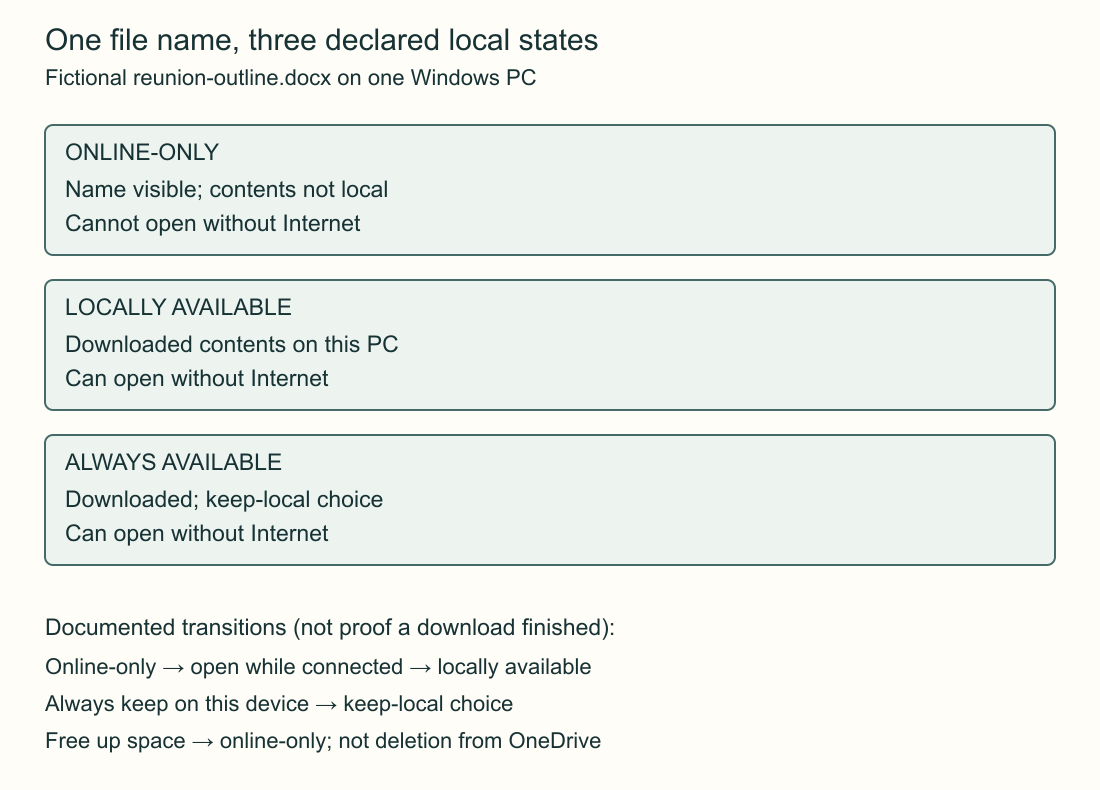
Start with online-only. Microsoft's documented opening action while connected downloads the contents and leads to locally available. Always keep on this device expresses the stronger local-retention choice. Free up space changes a locally held file back to online-only. None of those descriptions requires reunion-outline.docx to acquire a different name.
The original diagram separates the state labels from the transition labels. A box says what is true of the file's local availability; an arrow says which documented action changes that availability. Reading only an arrow can confuse a requested action with a completed state.
Free up space is not deletion. Microsoft's page expressly says making a file online-only does not delete it from OneDrive. That distinction belongs here only to prevent the wrong transition being chosen; this is not an account-cleanup or deletion workflow.
Prepare one actual work item instead of an impressive folder list
Before the fictional meeting, the useful note would identify reunion-outline.docx, the Windows PC and the intended always-available state. If two documents are required, name both; don't let a remembered folder name stand in for each file's actual availability.
An independently readable preparation note might say: “We need reunion-outline.docx on the laptop we are taking. Confirm the intended offline state while connected.” It should not say that a download succeeded unless someone actually established that result. The ordinary document-opening requirements also remain separate from whether OneDrive has local file contents.
At the meeting, an unchanged file name is no surprise: all three versions used the same one. What matters is which declared state was actually reached. That keeps a visible inventory, a local file and a deliberate retention choice from collapsing into one vague idea of having the document.
Sources & further reading
Published sources for the details and examples discussed in this story.